By Amanda DiSilvestro
It’s no secret that image-driven networks such as Pinterest and Instagram are growing in popularity. And while other networks such as Facebook still hold the crown, the need for images hasn’t gone unnoticed. For this reason, Facebook seems to have taken advantage of 2013 as a time to improve and enlarge the images used on the platform. There are two major areas of the social network where you’ll see image changes: link previews and ad images.
These changes are important for all Facebook users, but are especially important for small businesses because link previews and ads are two major ways businesses foster engagement on a Facebook page. And because Facebook is the one creating the ads and the link previews, it’s crucial everything goes according to plan. This then leads to a few inevitable questions: What are the changes to image size and how can I make sure my images fit?
New Sizes for Link Previews
A link preview refers to how an image is displayed when it is connected to a link. If a company wants to link to a blog post, news article, funny video, etc., that photo associated with the link now looks larger. According to Facebook, these images are now 4X larger on mobile and 8X larger on a desktop. Consider the before and after screenshots below.
Facebook Link Previews Before:

Facebook Link Previews After:
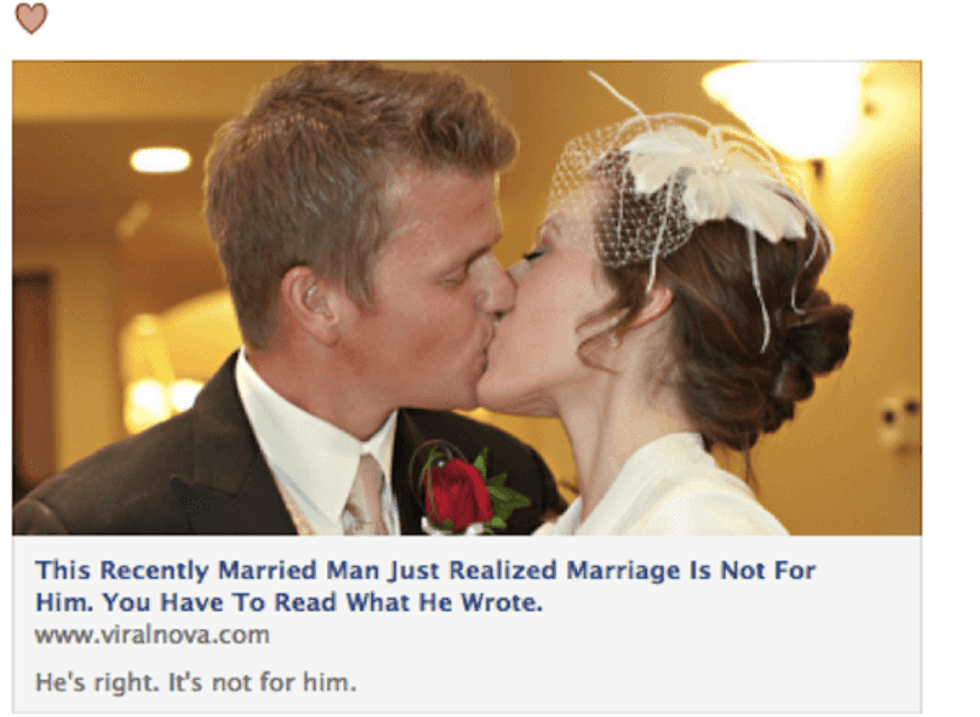
As you can see, the new layout jumps off the page and makes it easier for users to click. The idea here is that more small businesses will be able to share news stories and blog posts and earn more clicks. Small businesses therefore need to make sure that any photos associated with a link that they are posting on Facebook are the correct sizes so they are clear. Below are dimensions for designers and developers:
- Make sure your images are 1200px X 630px or greater for high resolution devices.
- Images should display a minimum of 600px X 315px.
- Use an aspect ratio of 1.91-to-1 (or as close to that as you can) to avoid any cropping of the photo in the newsfeed.
You will want to be in control whenever you choose a photo that will be associated with a link preview so you can be sure it's good quality. Use the og:image tag when choosing your image to make this happen.
To make changes to a photo that's being used with a link preview, you have to be signed into your account as the admin. Once you’re signed in, you can proceed to the Facebook post and upload a different image if the one Facebook chose doesn’t work well.
New Sizes for Ad Images
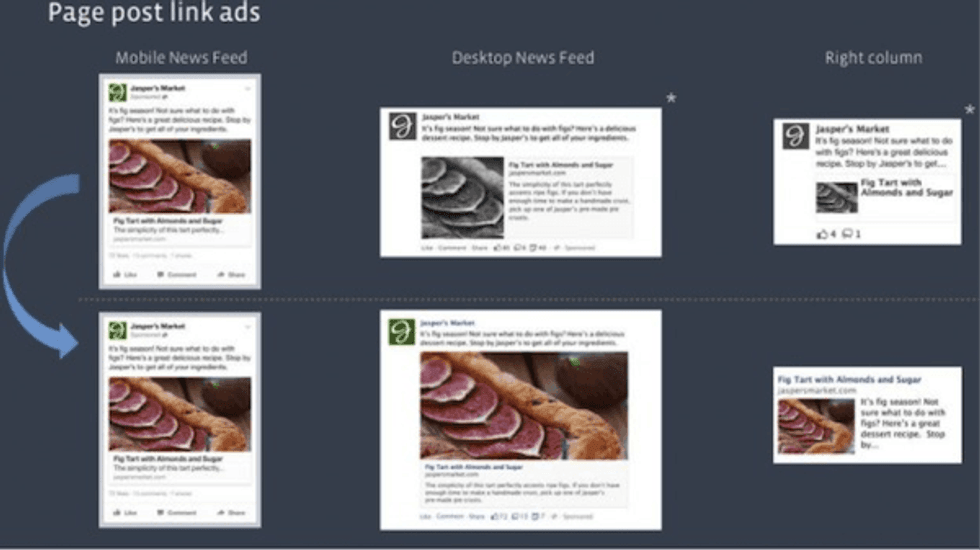
The changes affecting link previews also apply to ad images. After all, a good ad always includes a link; therefore, an ad is a type of link preview. Below is a screenshot from Mashable that shows great examples of before and after ad shots:
The following are a few additional things to be aware of concerning the new Facebook ad images:
- Consistency. Probably the coolest thing about Facebook’s ad image changes is the fact that all images are now consistent across all platforms. In other words, an ad you see on a mobile device will be the same size on a desktop. This makes it easier for small businesses looking to advertise because several different images sizes are no longer needed.
- Size. According to the Facebook announcement, in the most extreme cases, an ad will be 3.5 times larger than it was in the past, so the change isn’t too drastic.
- Engagement. In the past, a user had to click on a hyperlink to be taken to an ad page, but now a user can simply click the image. This will hopefully improve CTR for businesses.
Quick reminder: It’s recommended you use images that are at least 1200px wide so the image will display appropriately. You can now use the same aspect ratio across a desktop and mobile newsfeed as well (1.91-to-1).
Ad prices will not change just because images have been resized. The idea was to improve engagement and CTR for businesses and to help users connect with the information they’ve “liked” in the past.
So What Does This Mean for Your Designers and Developers?
The changes shouldn’t be difficult for your design and/or development team to handle. It’s important that you alert your team of the changes so that they can be sure all photos look clear on Facebook. Facebook will alter photos for you the best they can, so it’s not out of the question to have anyone in your department publish a post (your social media or SEO team most likely); however, it wouldn’t hurt to have your developers glance over all of the images posts throughout the day.