When the iPad came out last year, there was nothing else remotely like it. Since then, however, Apple's iPad 2 and a slew of competitors from other companies have added some real variety to the tablet scene.
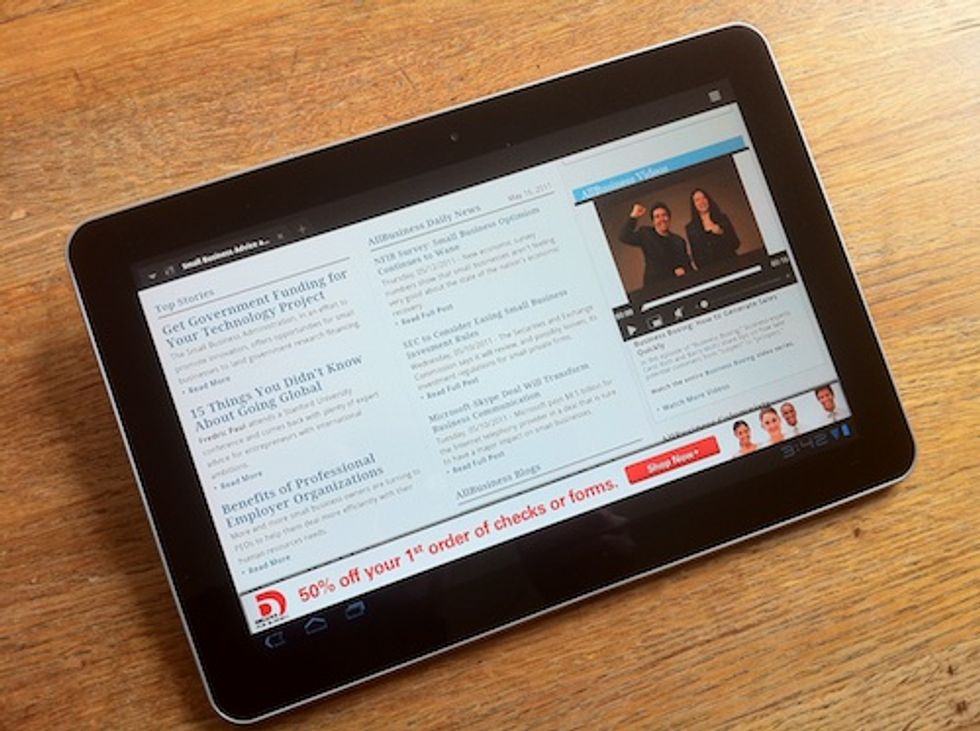
Now there's yet another player to consider: The Samsung Galaxy Tab 10.1.And after a couple of days testing (OK, playing with) a special-edition version for the Galaxy Tab obtained at the Google I/O conference last week, I can say that it turns in a respectable showing compared to the iPad2 - even if Apple's tablet remains the clear leader.
Can Honeycomb Hold Its Own?
Like the Motorola Xoom, the Galaxy Tab 10.1 meets or beats the iPad 2 in terms of its hardware specs and many aspects of the user experience -- and it's just as thin and even lighter. And unlike the Xoom, the Galaxy Tab 10.1 achieves this at a price that's highly competitive versus the iPad. As a Web browsing device, in particular, the Galaxy Tab 10.1 improves on the iPad 2 with the significant addition of Flash support -- Adobe's widespread Web animation and video standard that Apple adamantly refuses to embrace.
Read More! Check out the AllBusiness Tablet Tech Review Center for the latest expert reviews and news.
But, of course, that's far from the whole story. For now, at least, Apple's iOS operating system remains noticeably smoother and more polished than Android 3.01 (Honeycomb), the latest version of Google's mobile operating system designed specifically for tablets rather than smartphones.
Android Can't Close the App Gap
Just as important, Apple's iPad retains its overwhelming lead in the number and quality of apps it can run. And that advantage is even more pronounced when it comes to tablet-specific apps and business apps.
While the Galaxy Tab 10.1 can use most of the 200,000 apps available in the Android Market, there are still almost no Android apps designed to take full advantage of the tablet form factor, not to mention the specific attributes of the Galaxy Tab 10.1. It's an issue that also plagues the Xoom and other Honeycomb-powered tablets, and while many Android apps designed for smartphones can run on Honeycomb, that doesn't mean they look good or run well on the tablet form factor.
As more Android tablets become available, and more people buy them, developers will no doubt create more tablet apps. But with the iPad still holding 80 percent of the tablet market, it's likely to be a long time -- if ever -- before Android tablet app options meet or surpass what's available in Apple's App Store.
Galaxy Tab vs. iPad: Dueling Specs
Before I lay out the differences in how it feels to use the Galaxy Tab 10.1, let's take a look at its basic specs compared with the iPad 2:
Size/Weight:
Galaxy Tab: 6.9 x 0.34 x 10.1 inches / 1.24lbs
iPad: 7.3 x 0.34 x 9.5 inches / 1.33 lbs
Screen:
Galaxy Tab: 10.1 inches / 1280 x 800 resolution
iPad: 9.7 inches / 1024 x 768 resolution
Processor:
Galaxy Tab: 1 GHz dual-core
iPad: 1GHz dual-core
Camera:
Galaxy Tab: 8 Megapixel rear (w/LED flash) and 2 Megapixels front
iPad: .92 Megapixels rear and .3 Megapixels front (estimated)
Available Memory:
Galaxy Tab: 16GB or 32GB options
iPad: 16GB, 32GB, or 64GB options
(Note, these specs relate to the "Special Edition" version of the Galaxy Tab 10.1 released at Google I/O. The retail version may differ slightly.)
Fast with Flash
In practice, the best part of using the Galaxy Tab 10.1 is how snappy it feels loading Web pages and executing basic operations. And you never get that sinking feeling of coming to a website that simply doesn't work because it uses Flash. (That's good, because with so few Android tablet apps, Web pages and Web apps are the device's bread and butter.) One concern is that most websites see Android tablets as smartphones and serve up the mobile version instead of the full site. That can be really frustrating, and I couldn't find any way to work around the issue.
Though the Galaxy Tab's gorgeous 16 x 9 ratio widescreen didn't feel any bigger or sharper than the iPad's, it worked great for watching movies. But like other widescreen tablets, it's a little awkward in portrait mode. Similarly, the Galaxy Tab 10.1's cameras far outshine the iPad 2's, especially for still pictures. But does anyone really want to use a giant slab to snap photos? Not me, except in an emergency.
The Long Path from Good to Great
Despite lingering limitations -- there's no USB port, for example -- the Galaxy Tab 10.1 is pretty much state of the art for an Android tablet. But that begs the question of whether an Android tablet is the best choice for your business. For now, I believe the iPad 2 still delivers a better overall tablet experience, with its easier to use software and more advanced user interface. But the biggest issue is apps: You're much more likely to find software that can actually help your business in Apple's App Store than Google's Android Market.
Read More! Check out the AllBusiness Tablet Tech Review Center for the latest expert reviews and news.
Yet there is one more thing business users need to consider. Choosing an Android tablet means you don't have to use Apple's bloated and confusing iTunes program on your computer to synch and transfer files, content, and applications. For business users, avoiding iTunes' usability quirks, support issues, and general distraction factor is a huge win.iTunes just doesn't belong in business settings.
But skipping iTunes still isn't quite enough to put the Galaxy Tab 10.1 - or any other device that isn't an iPad -- on top of the tablet heap. Android may someday seize Apple's tablet crown, but it hasn't happened yet.
Samsung Galaxy Tab 10.1
MSRP: $499.99 (16GB memory) or $599.99 (32GB)
Note: We tested a special-edition Wi-FI version of the Galaxy Tab 10.1 distributed at Google I/O. General consumer release is expected on June 8, 2011 for $500 (16GB) and $600 (32GB). While 3G models are also expected, carrier details and pricing was not available at post time.
PROS:
- Runs tablet-friendly Android "Honeycomb" OS, with Flash support
- Thin and light
- Good display quality
CONS:
- Weak Android-tablet app support
- Limited connectivity
- User experience still not as polished as the iPad 2
THE BOTTOM LINE:
The Samsung Galaxy Tab 10.1 may be the best Android tablet on the market. Until Android tablet app support improves dramatically, however, the iPad 2 remains a better choice for most business users.