In the last post, I talked about managing payables to minimize costs. Here, I’m going to address business owners who have limited working capital and are more concerned with balancing cash outflows with inflows. There are three major objectives that need to be addressed. In order of importance:
- Assure that cash is available as such critical payments as payroll, rent and debt service become due.
- Assure that critical suppliers of goods and services are sufficiently satisfied with your bill payment history to continue as providers with acceptable pricing.
- Provide sufficient working capital to fund deals that might be highly profitable but require up-front investment before revenues can be realized.
Before any of these objectives can be met, you need to have accurate and timely information about cash resources available, amounts and collection status of receivables, and amounts and aging status of payables. Timely and accurate information is absolutely critical to meeting your objectives. Otherwise, you will be blindsided by bounced checks, unhappy vendors, and/or employees abandoning ship because you couldn’t make payroll on time.
That said, while we have to control our cash disbursements, we also depend on customers to pay us in a timely manner and can only predict when payments will be received. Therefore, we need a flexible tool to predict cash flow under various scenarios. Available cash is the starting point for this prediction. From this balance, we can add expected receipts and subtract disbursements over a specific timeframe to arrive at an ending cash balance.
Scenario One
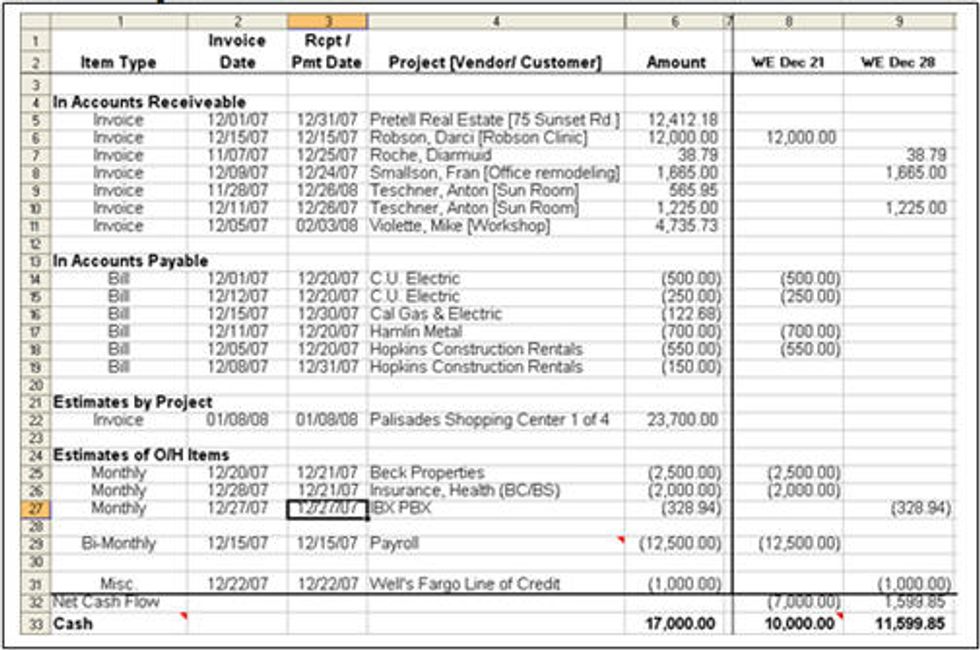
For example, let’s say we start with a $17,000 cash position at the beginning of the week. We expect to be paid $12,000 from outstanding receivables, and we know we have to pay the $12,500 payroll due on Friday. If everything goes as planned, we will have $16,500 at the end of the week; $17,000 + $12,000 - $12,500 = $16,500. We plan on paying $6,500 in bills, of which $2,500 is for rent, which will leave us with an ending cash balance of $10.000.
Scenario Two
But what if everything doesn’t go as planned? What if we find out Wednesday morning that the $12,000 in customer payments will not arrive until next week? Now we have to make some adjustments. Fortunately, we already have enough to pay payroll ($17,000 - $12,500 = $4,500) but we can’t pay the other bills as expected. We need to set priorities as to who to pay. The most critical payable is the rent payment of $2,500, which leaves us with only $2,000. Since we need to make a $1,000 debt service payment next week, we decide to hold off paying other bills until we are in possession of our customer payments but will assume that the $12,000 in customer payments will arrive next week, allowing us to pay the bills we had intended to pay this week.
The example demonstrates scenario one above in an Excel worksheet I use to project future cash flows.
The example below demonstrated scenario two.
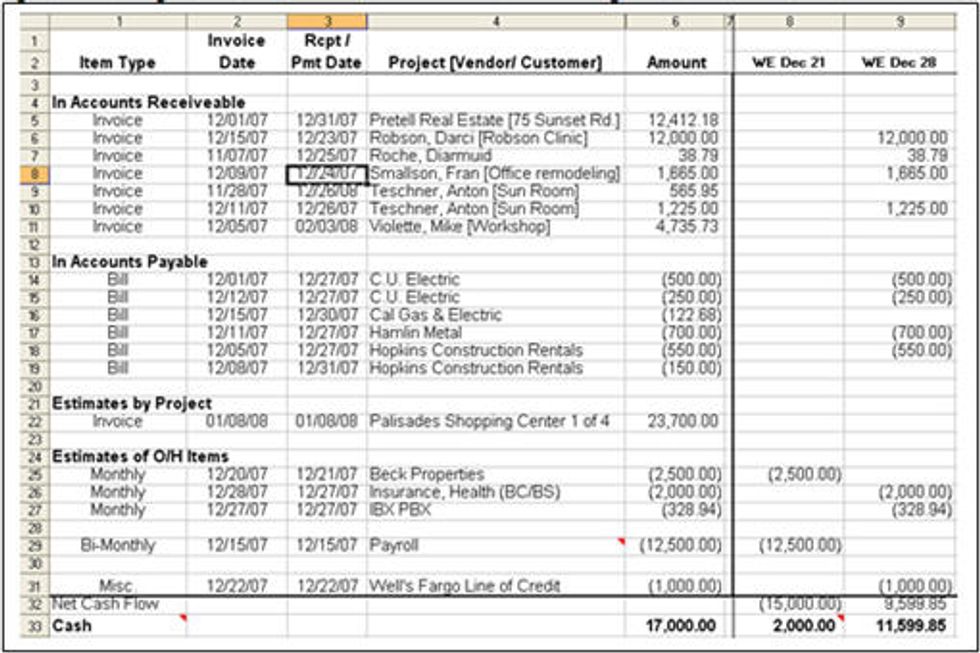
Excel makes a great tool to evaluate “what-if” scenarios because we can use formulas to automatically calculate the net cash flow and cash balance rows. As we move expected receipts and disbursements from week to week Excel will automatically recalculate out cash balances.
In the examples above, I exported the payables and receivables information from QuickBooks into a pre-programmed template that allowed me to quickly integrate current accounting information into my cash flow model. By using Excel’s programming tool called VBA, I changed cash flow scenarios by changing the dates in the “Rcpt / Pmt Date” column and clicking an icon on a VBA created toolbar. When it comes to cash receipts, we are talking about probabilities. Therefore, your cash flow modeling tool must make it fast and easy to create and evaluate multiple cash scenarios.