Sometimes the world just gets messy and we need to find a way to create order out of chaos. Having been a controller for some Houston oil wildcatters during an oil boom I am intimately familiar with chaos. I would like to thank Lynn Boynton of SmartRevenue for posing the following question.
Issue to be resolved
Sometimes a project manager requests a PO for the full amount of services being purchased and, then, the vendor bills us for only 1/3 or 1/2, etc. QuickBooks won’t allow you to enter a bill for an amount less than the purchase order. Is there someway around this that you know of?
An Important Qualification
Please do not rely on this methodology as being in strict comliiance with generally accepted accounting principals or a complete solution in the preparation of your tax return. I recommend that, before implementing what I am about to describe, you discuss it with your own accounting and tax advisors. The issue to be resolved is the time frame in which you want to recognize an expense. You should make your accounting professionals aware of the methodology being applied here so they can make any necessary adjustments in preparing financial statements or your tax return.
My way, but not the highway
(let me know if you have a better solution)We are going to create a clearing account for partial bills against a purchase order and that account can be either an asset or an expense account. For my example, I am going to create an "other current asset" account named "Prepaid Expenses" to post partial bills against the purchase order.
Create a new account and a new item
- Create an "other current asset" account named "Prepaid Expenses"
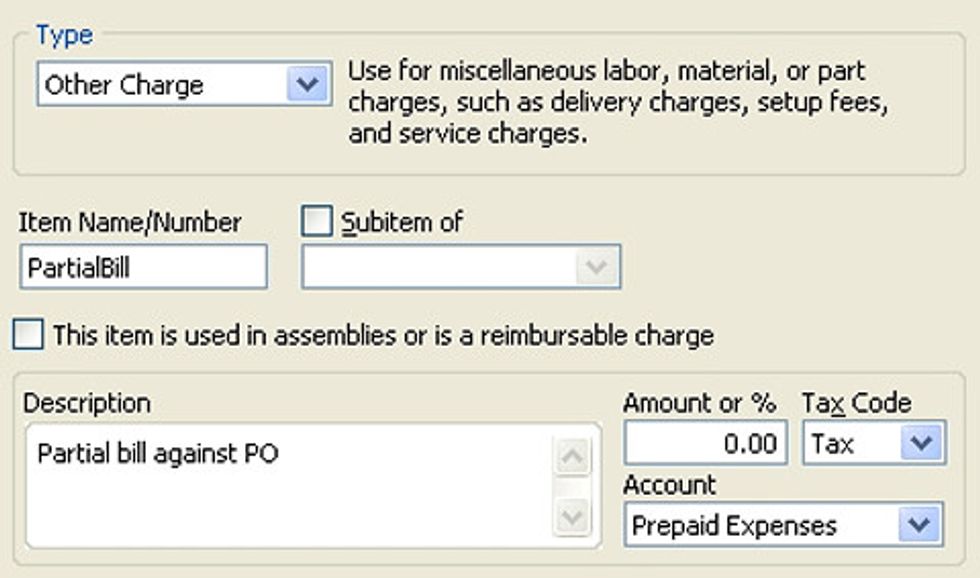
- Create an "Other Charge" Item with the name "PartialBill", a description "Partial bill against PO" and point it to the "Prepaid Expenses" account as shown below.
Recording all partial bills EXCEPT the final bill
Upon receipt of a partial bill, open your purchase order and enter a new line item "Partial Bill", enter the amount of the partial bill, and save the PO.
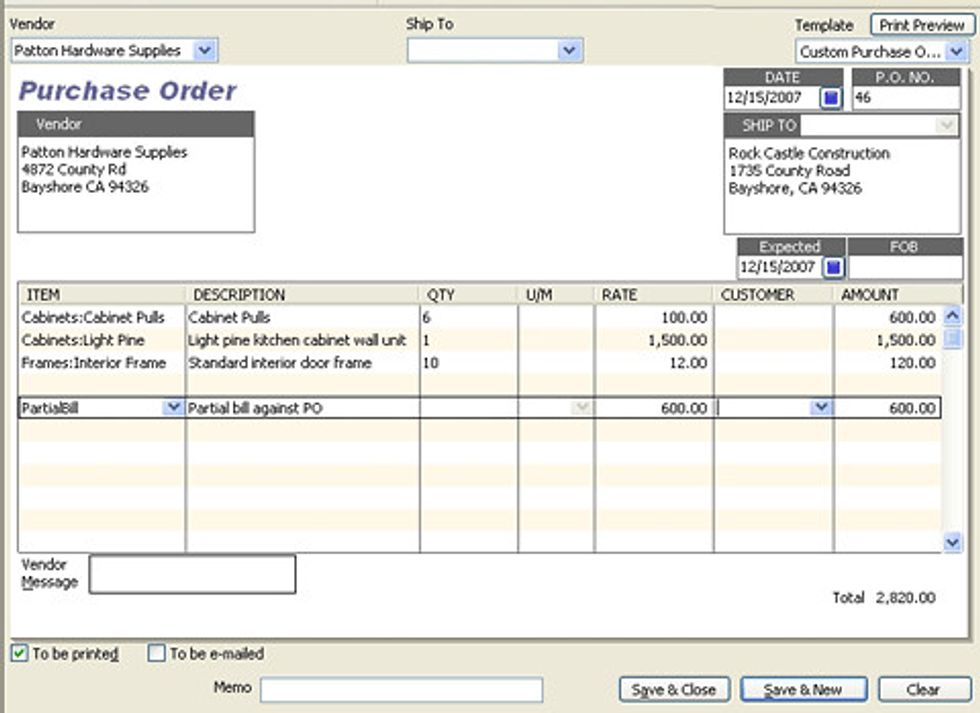
Enter the vendor bill. When you enter the vendor name and are presented with outstanding POs for this vendor, select the updated purchase order. As you would expect all items in the purchase order are automatically entered into the bill. That doesn't mean you can't delete them from the bill and leave them open in the PO.
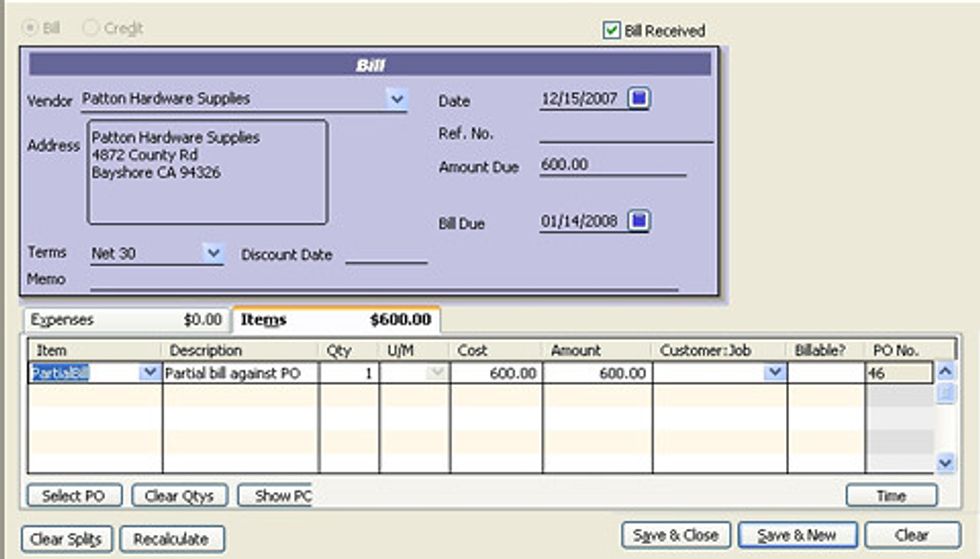
Use CTRL-DELETE to delete all but the PartialBill item you just entered into the PO. The bill total should match the vendor bill. Save and close the bill.
Note: Repeat this process for all BUT the final vendor bill.
Recording the Final Bill Against the Purchase Order
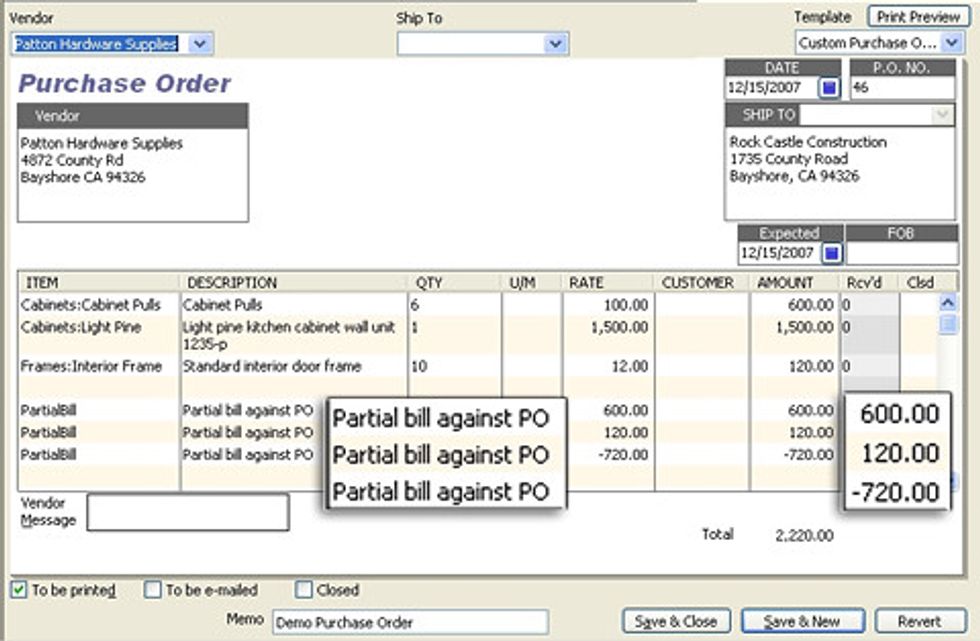
Upon receipt of the final bill, open your purchase order and a new line item "Partial Bill".
Enter a NEGATIVE amount equal to the sum of all previous vendor bills against this purchase order and save the PO. These previous bills will be shown on the purchase order making it easy to calculate them.
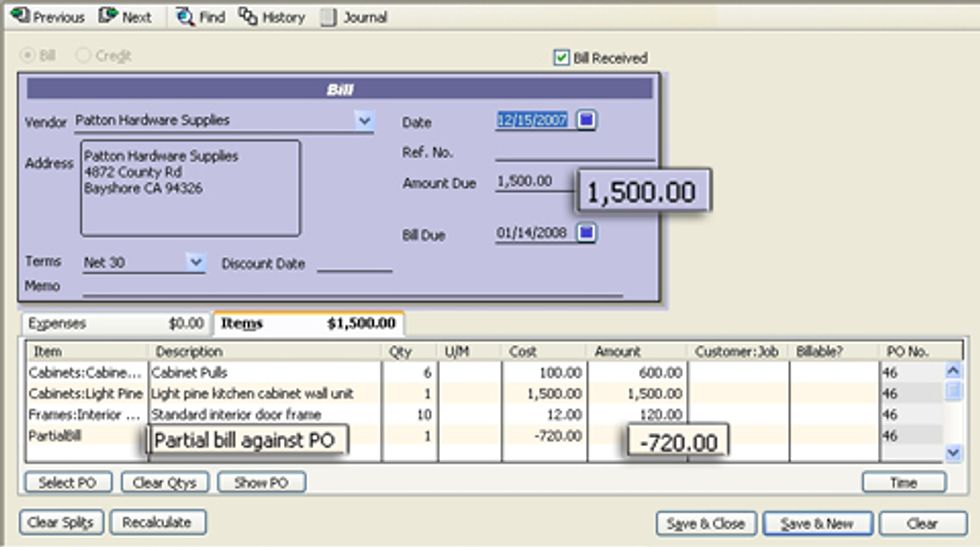
Enter the vendor bill. When you enter the vendor name and are presented with outstanding POs for this vendor, select the updated purchase order. QuickBooks will automatically complete the form with all outstanding items in the purchase order, which will include the actual items purchased and the negative partial bill entry.
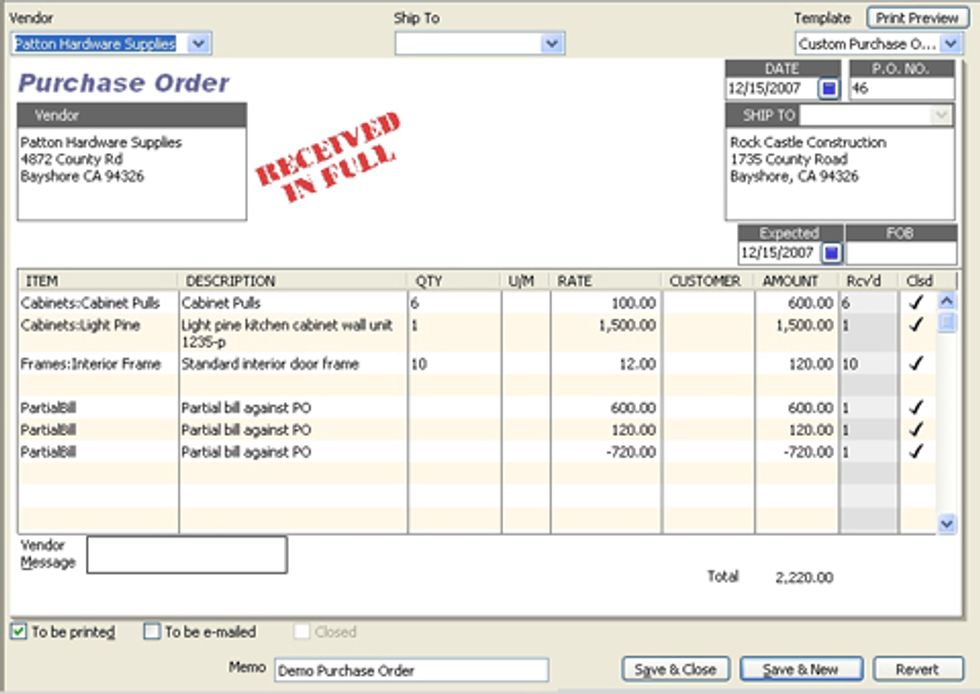
If you look at the purchase order now, you see that it is not stamped "Received In Full"
Now let's see how this all worked out for the accounting entries generated.
Notice below that the pre-final partial bills resulted in an increase in accounts payable and an increase in the other current asset, "Prepaid" expenses. When we entered our final bill, the negative entry for "PartialBill" cleared our "Prepaid Expenses" account and the actual purchases were recorded to the appropriate expense accounts.
I am showing the "under the hood" journal entries by vendor invoice and then in total by account.
| Acounting Entries by Vendor Bill | ||||||
| Vendor Bill | Item | Account | Debit | Credit | ||
| First Bill | Accounts Payable | 600.00 | ||||
| PartialBill | Prepaid Expenses | 600.00 | ||||
| Second Bill | Accounts Payable | 120.00 | ||||
| PartialBill | Prepaid Expenses | 120.00 | ||||
| Final Bill | Accounts Payable | 1,500.00 | ||||
| Cabinets:Cabinet Pulls | Inventory Asset | 600.00 | ||||
| Cabinets:Light Pine | Inventory Asset | 1,500.00 | ||||
| Frames:Interior Frame | Inventory Asset | 120.00 | ||||
| PartialBill | Prepaid Expenses | 720.00 | ||||
| Acounting Entries by Account | ||||||
| First Bill | Accounts Payable | 600.00 | ||||
| Second Bill | Accounts Payable | 120.00 | ||||
| Final Bill | Accounts Payable | 1,500.00 | ||||
| First Bill | PartialBill | Prepaid Expenses | 600.00 | |||
| Second Bill | PartialBill | Prepaid Expenses | 120.00 | |||
| Final Bill | PartialBill | Prepaid Expenses | 720.00 | |||
| Final Bill | Cabinets:Cabinet Pulls | Inventory Asset | 600.00 | |||
| Final Bill | Cabinets:Light Pine | Inventory Asset | 1,500.00 | |||
| Final Bill | Frames:Interior Frame | Inventory Asset | 120.00 | |||
Robert Guild is certified QuickBooks ProAdvisor in Austin, TX who conducts CPE courses for CPAs and individual training and group classes to QuickBooks users. His company at www.QBCoach.biz, maintains a sixteen-station QuickBooks lab, providing hands-on training. You can contact him directly at rguild@QBCoach.biz or follow him on twitter at QBPro