AllBusiness.com
  • Starting a Business
  • Career
  • Sales & Marketing
  • AI
  • Finance & Fundraising
  • M & A
  • Tech
  • Business Resources
  • Business Directory
  1. Home »
  2. Finance »
  3. Billing a Client for Multiple Projects on One Invoice »
invoice document

Billing a Client for Multiple Projects on One Invoice

Robert Guild
Finance

Sometimes clients can be very particular about how they want you to invoice them for work.  In this case, a consulting client for several ongoing projects wanted each invoice to include a summary by project for all hours worked that period.

Since QuickBooks is designed to invoice customers at a project level, this presented a problem. The solution below can only be used in a limited scenario because it replaces jobs in the customer list with service items in the item list. Instead of tracking time at a customer/job level and using items to categorize a type of service, we are tracking time at a customer ONLY level and using items to identify projects.

In the example below, we see that the customer, Harrison Norwood has a number of jobs in progress and we are logging time activities for each job.
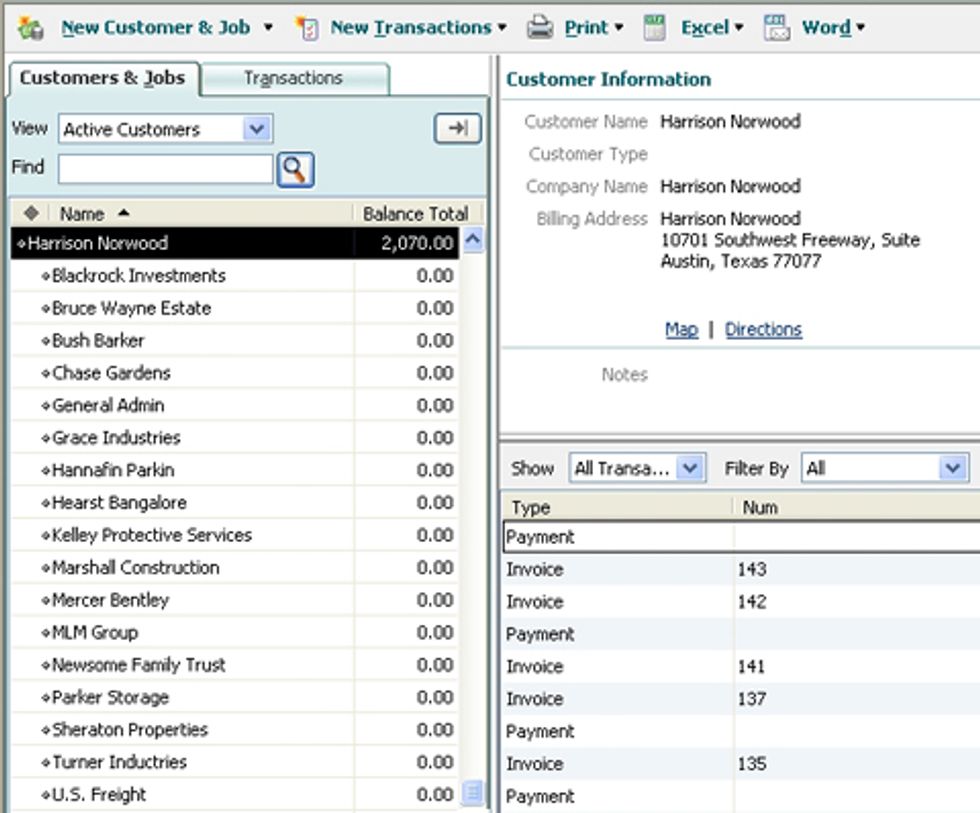
Austin_QuickBooks_Coach_01

We have created items in the item list as subitems of the item “Harrison Norwood” to keep things organized as shown below.
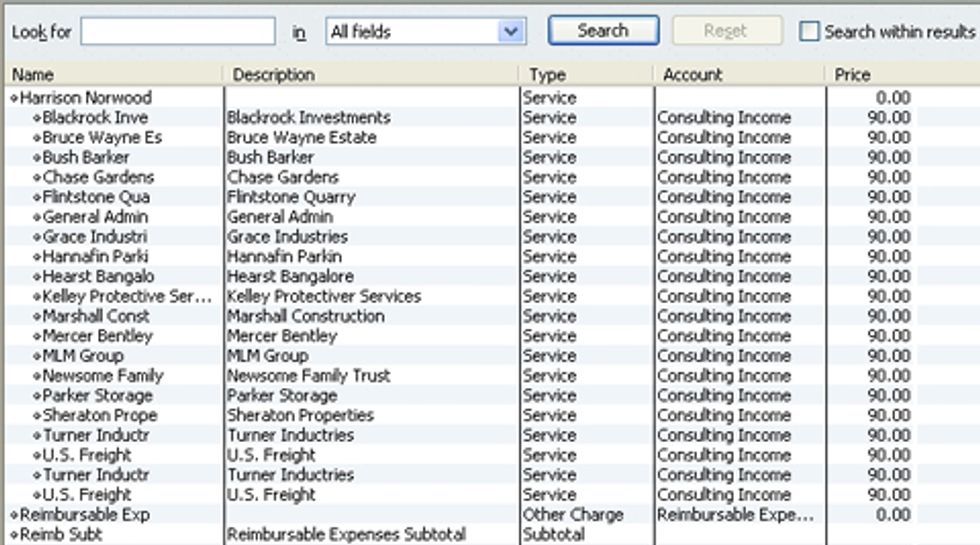
Austin_QuickBooks_Coach_02

By recording time at a customer level and using items to identify jobs, we can see a “Time by Job Detail” report organized by client with no underlying job, instead using our new items in place of the jobs.
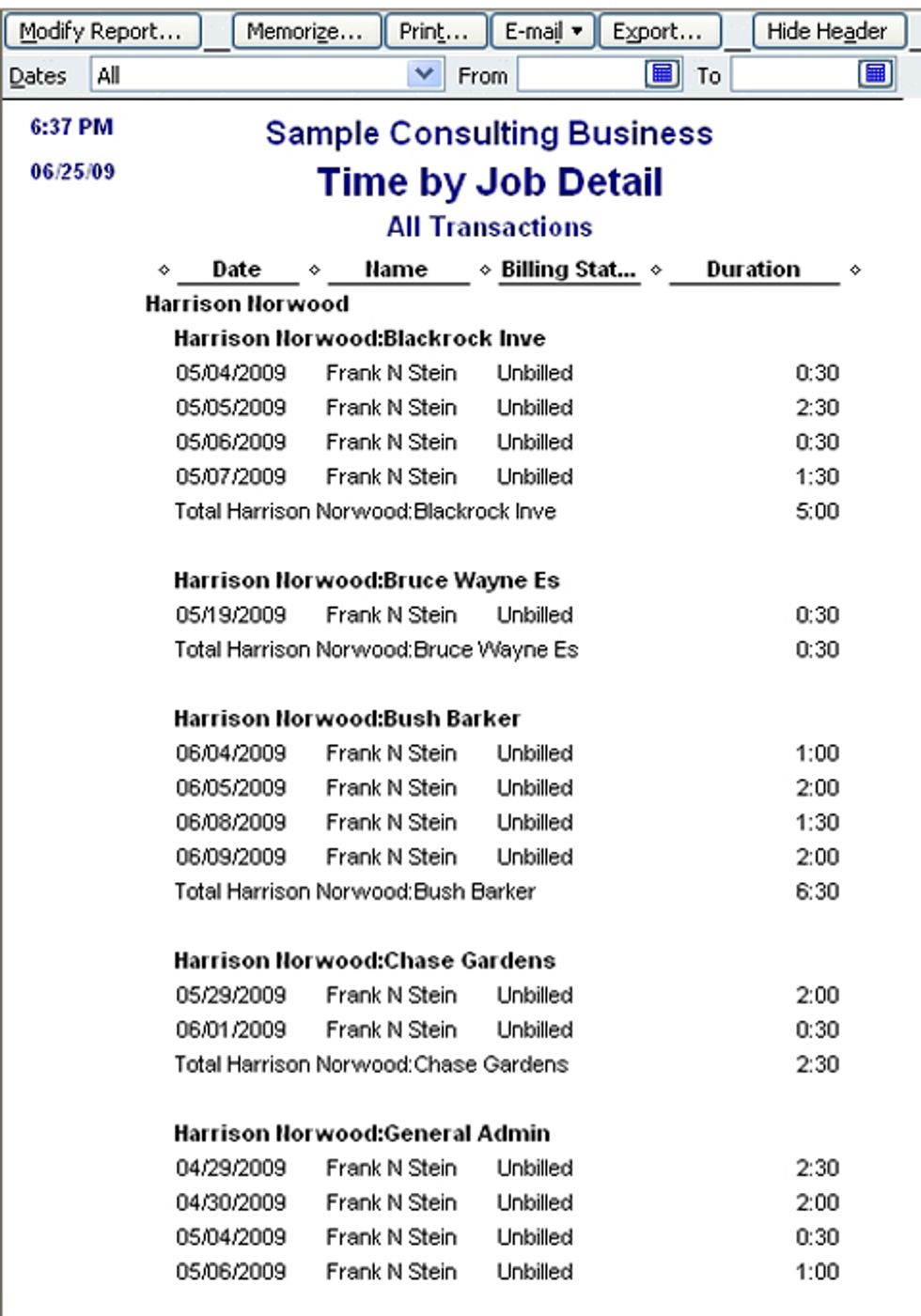
Austin_QuickBooks_Coach_03

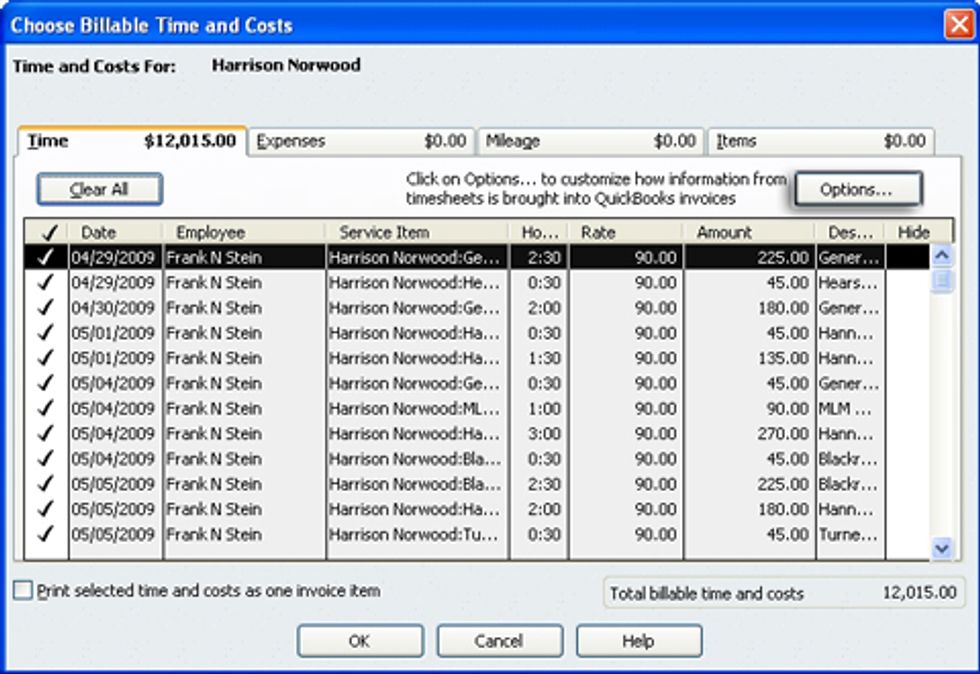
This will allow us to generate a single invoice for all “jobs” by using items. You are now ready to create an invoice. Select "Invoice for Time and Expenses" from the "Customers" menu. Select "Harrison Norwood" from a list by Customer and Jobs and then select "Create Invoice" and "Selected Items."
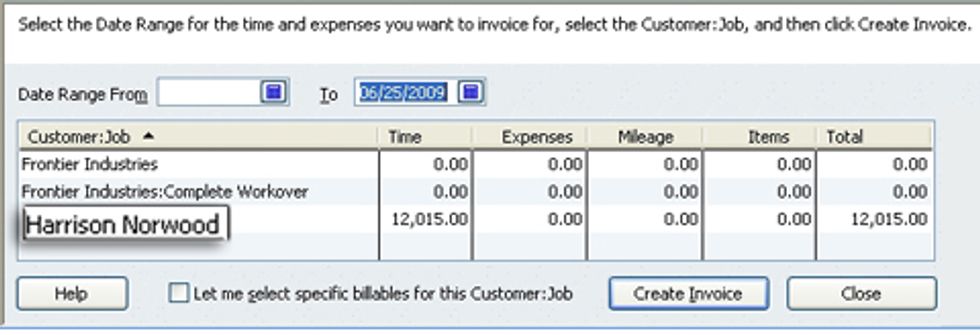
Austin_QuickBooks_Coach_04

Select the “Option” icon.

Austin_QuickBooks_Coach_05

For this client we will combine activities with the same service item and rate.
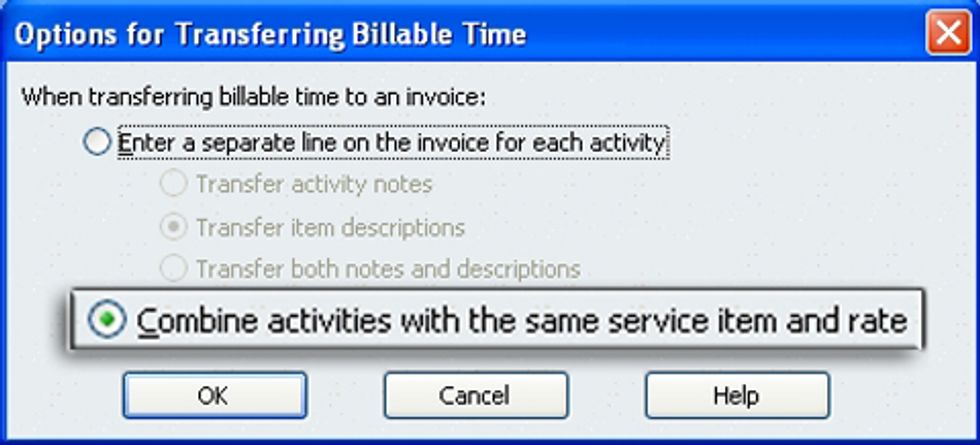
Austin_QuickBooks_Coach_06

We have now created an invoice that includes hour spent on all jobs. Here’s the “gotcha.” Unless you select an activity detail activity notes will not be included. Unfortunately, when you select a detail the activities will be listed in date order an not project by date order. You can, however, modify the summary description for each item to type in notes about the work done on that project.
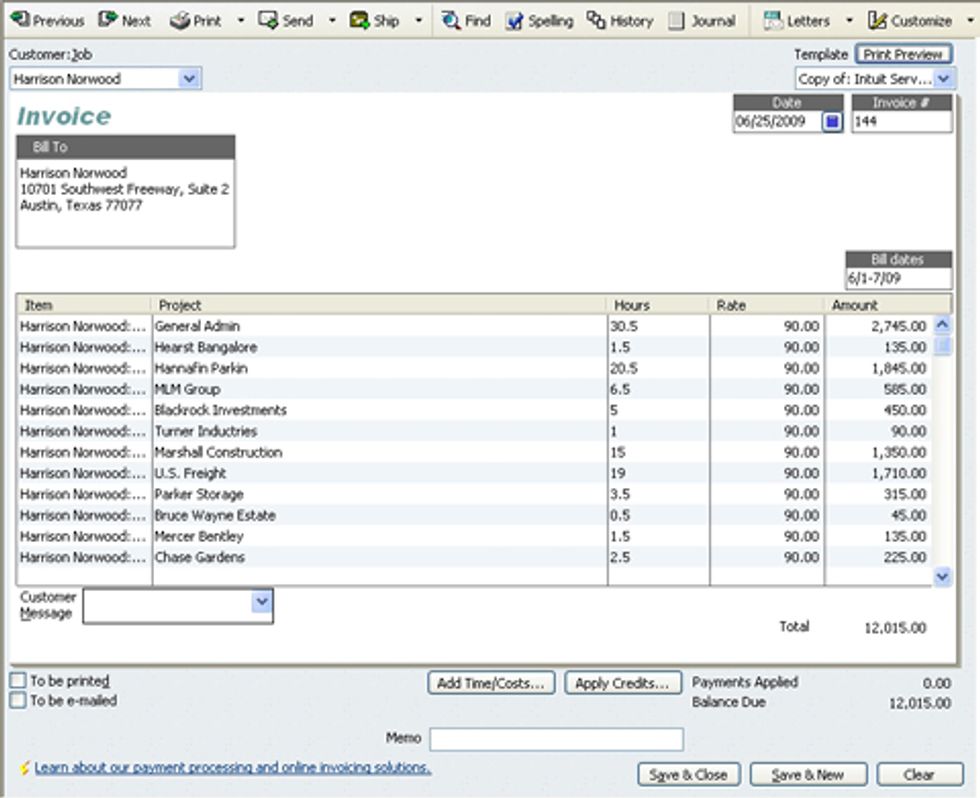
Austin_QuickBooks_Coach_07

The resultant invoice is shown below.
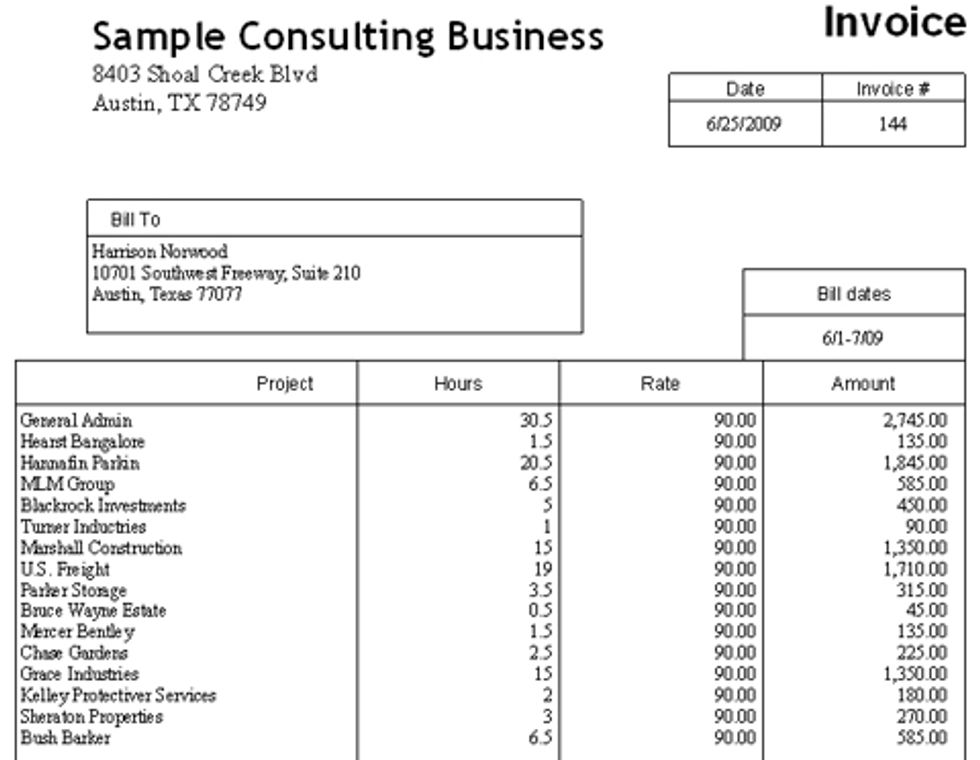
Austin_QuickBooks_Coach_08

Robert Guild is certified QuickBooks ProAdvisor in Austin, TX who conducts CPE courses for CPAs and individual training and group classes to QuickBooks users. His company maintains a sixteen-station QuickBooks lab, providing hands-on training. You can contact him directly at rguild@QBCoach.biz or follow him on Twitter at QBPro.


Hot Stories

How the 2026 Estate Tax Changes Could Impact Your Small Business

How the 2026 Estate Tax Changes Could Impact Your Small Business

Small business tax documents

So You Missed the S Corporation Election Deadline? Now What?

Profile: Robert Guild

Robert Guild is a QuickBooks Certified ProAdvisor, trainer, and accounting consultant offering group and individual training to CPAs, clients, and students.

BizBuySell
logo
AllBusiness.com is a premier business website dedicated to providing entrepreneurs, business owners, and business professionals with articles, insights, actionable advice,
and cutting-edge guides and resources. Covering a wide range of topics, from starting a business, fundraising, sales and marketing, and leadership, to emerging AI
technologies and industry trends, AllBusiness.com empowers professionals with the knowledge they need to succeed.
About UsContact UsExpert AuthorsGuest PostEmail NewsletterAdvertiseCookiesIntellectual PropertyTerms of UsePrivacy Policy
Copyright © AliBusiness.com All Rights Reserved.
logo
  • Experts
    • Latest Expert Articles
    • Expert Bios
    • Become an Expert
    • Become a Contributor
  • Starting a Business
    • Home-Based Business
    • Online Business
    • Franchising
    • Buying a Business
    • Selling a Business
    • Starting a Business
  • AI
  • Sales & Marketing
    • Advertising, Marketing & PR
    • Customer Service
    • E-Commerce
    • Pricing and Merchandising
    • Sales
    • Content Marketing
    • Search Engine Marketing
    • Search Engine Optimization
    • Social Media
  • Finance & Fundraising
    • Angel and Venture Funding
    • Accounting and Budgeting
    • Business Planning
    • Financing & Credit
    • Insurance & Risk Management
    • Legal
    • Taxes
    • Personal Finance
  • Technology
    • Apps
    • Cloud Computing
    • Hardware
    • Internet
    • Mobile
    • Security
    • Software
    • SOHO & Home Businesses
    • Office Technology
  • Career
    • Company Culture
    • Compensation & Benefits
    • Employee Evaluations
    • Health & Safety
    • Hiring & Firing
    • Women in Business
    • Outsourcing
    • Your Career
    • Operations
    • Mergers and Acquisitions
  • Operations
  • Mergers & Acquisitions
  • Business Resources
    • AI Dictionary
    • Forms and Agreements
    • Guides
    • Company Profiles
      • Business Directory
      • Create a Profile
      • Sample Profile
    • Business Terms Dictionary
    • Personal Finance Dictionary
    • Slideshows
    • Entrepreneur Profiles
    • Product Reviews
    • Video
  • About Us
    • Create Company Profile
    • Advertise
    • Email Newsletter
    • Contact Us
    • About Us
    • Terms of Use
    • Contribute Content
    • Intellectual Property
    • Privacy
    • Cookies